


850,00 د.إ Original price was: 850,00 د.إ.780,00 د.إCurrent price is: 780,00 د.إ.
The DropAir DK-S21 Daikin S21 Adapter connects compatible Daikin multi-split AC systems to supported Google Nest, Ecobee and other 24V smart thermostats. Features an S21 connection and Mini6S interface for smart AC control.

4 payments No interest. No fees.

Genuine All devices
Order via WhatsApp in minutes
Free return within 7 days
Available 7 days a week
Join hundreds of UAE residents who trust JustCare for their smart home needs.
Posted on Google
 Dina Mansour
Trustindex verifies that the original source of the review is Google.
I highly recommend this company super professional next day service Chand and Hamid Installed smart lock and they are very professionalPosted on Google Liju MathewI had an excellent experience with JustCare. Mr. Bilal and Mr. Hamid provided exceptionally professional, courteous, and kind service throughout the entire process. They were knowledgeable, punctual, and ensured that the smart door lock was installed properly and explained clearly. Their attention to detail and commitment to customer satisfaction were truly impressive. I highly recommend JustCare, particularly Mr. Bilal and Mr. Hamid, for any services related to smart door locks. Thank you for the outstanding service!Posted on Google
 Etienne MoutonWhat amazing service, professional people and a great result. I seamlessly ordered a smart lock for my house, same day installation and a perfect result. I would highly recommend the team at JustCare!Posted on Google
 Ahmed AThey installed my new smart lock, prefect service and on time, I would highly recommend. Special thanks to bilal and hamid.Posted on Google
 Dubai Car recovery Towing serviceBilal and Hamid came to our office for smart lock the best in there job RecommendPosted on Google
 AlexGreat service from Umair and irfanPosted on Google
 Hasse B (Hasse B)Bilal & Hamid superskilled, efficient and helpfulPosted on Google
 Liam RudevicsBilal and Hamid came to install my new smart lock on short notice today. They were excellent and the price was fair. Hamid did a clean job with the handy work and Bilal was very thorough and helpful with the set up and teaching me about the lock. They cleaned up before leaving too. Very satisfied. Thanks team
Want to upgrade your Daikin air conditioner with a Google Nest or Ecobee thermostat, but aren’t sure how to connect it? The challenge is often the AC’s existing control system rather than the thermostat itself.
The DropAir DK-S21 Daikin S21 Adapter provides a connection between selected Daikin multi-split indoor units and compatible 24V smart thermostats. Using the air conditioner’s S21 interface and a DropAir Mini6S module, it enables supported thermostat commands to be communicated to the AC system.
This makes the DK-S21 useful for homeowners and property managers who want modern thermostat controls while keeping their existing compatible Daikin air conditioning equipment.
Whether you’re upgrading an apartment in Dubai, improving AC control in an Abu Dhabi villa or planning a thermostat replacement in an office, the first step is identifying whether your indoor unit has the correct S21 connection.
Important: The DK-S21 is designed for specific Daikin configurations. Having a Daikin AC does not automatically mean this adapter will work with your system.
Many popular smart thermostats are designed for conventional 24V HVAC control wiring. Some Daikin multi-split air conditioners, however, communicate through manufacturer-specific connections instead of conventional thermostat terminals.
The DropAir DK-S21 addresses this difference by providing a supported interface between the thermostat and the air conditioning unit.
If your Daikin indoor unit and chosen thermostat are compatible, the adapter can make a smart thermostat upgrade possible without replacing the entire air conditioning system.
This can be particularly useful when the existing AC works well but you want a different wall controller with connected features.
Unlike a generic thermostat converter, the DK-S21 is designed specifically for compatible Daikin systems with an S21 connection.
The appropriate control commands are handled through the DropAir interface, allowing the connected thermostat to operate supported AC functions.
Depending on the thermostat and AC configuration, the completed installation may allow temperature adjustments, scheduling and smartphone-based control.
These connected features are provided through the supported thermostat platform. The adapter itself is not a replacement for the thermostat or its mobile app.
The Daikin S21 port is a connection found on selected Daikin indoor air conditioning units. It is used for communication with compatible controllers and interface devices.
Customers searching for a Daikin S21 connector, S21 port Daikin or Daikin S21 adapter are often trying to identify whether their existing equipment can work with a smart thermostat.
On supported Daikin indoor units, the S21 socket is located on the indoor unit’s electronic control board, also called the PCB.
The exact position varies by model. Finding it may require access to the indoor unit’s electrical compartment, so identification should be performed using the correct service documentation and appropriate electrical safety procedures.
No. S21 and P1/P2 are different Daikin control interfaces.
The S21 connection is associated with selected Daikin systems, while P1/P2 is used in other supported controller arrangements, including many VRV/VRF installations.
You should not substitute a P1/P2 adapter for an S21 adapter simply because both products are intended for Daikin air conditioners.
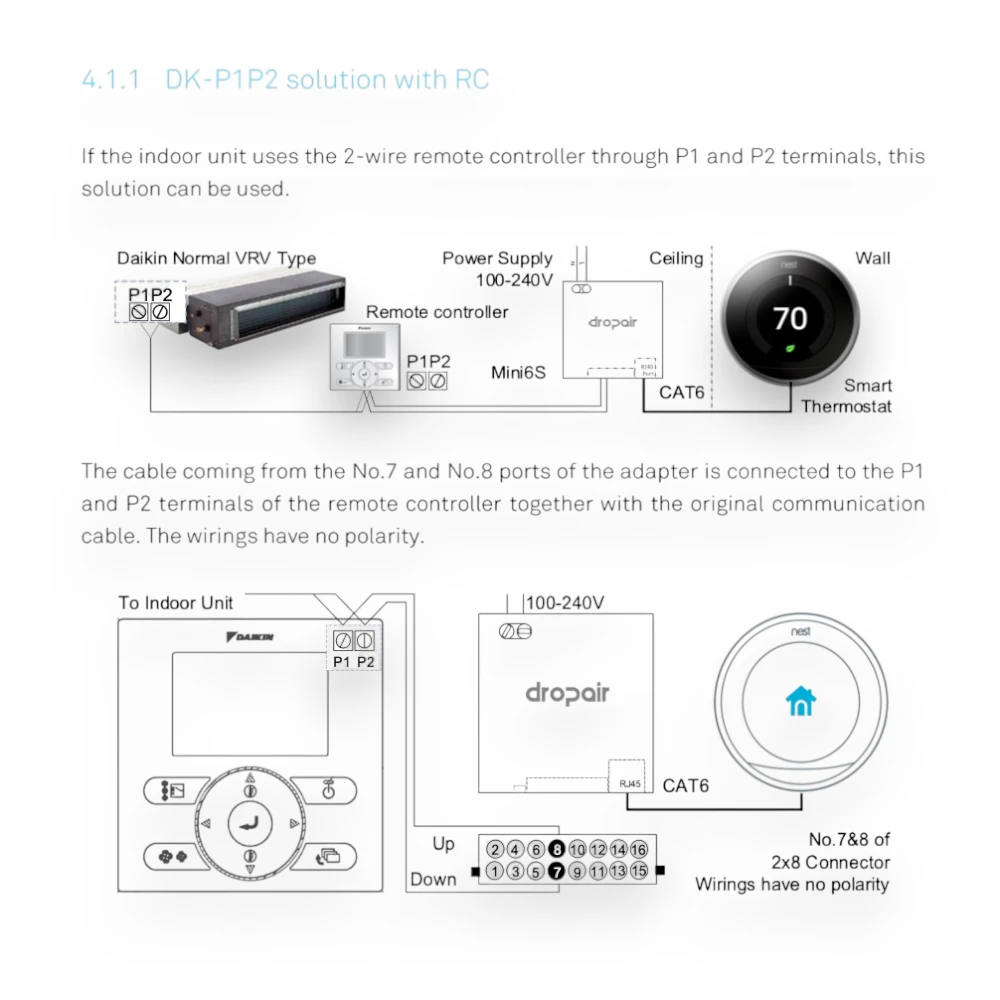
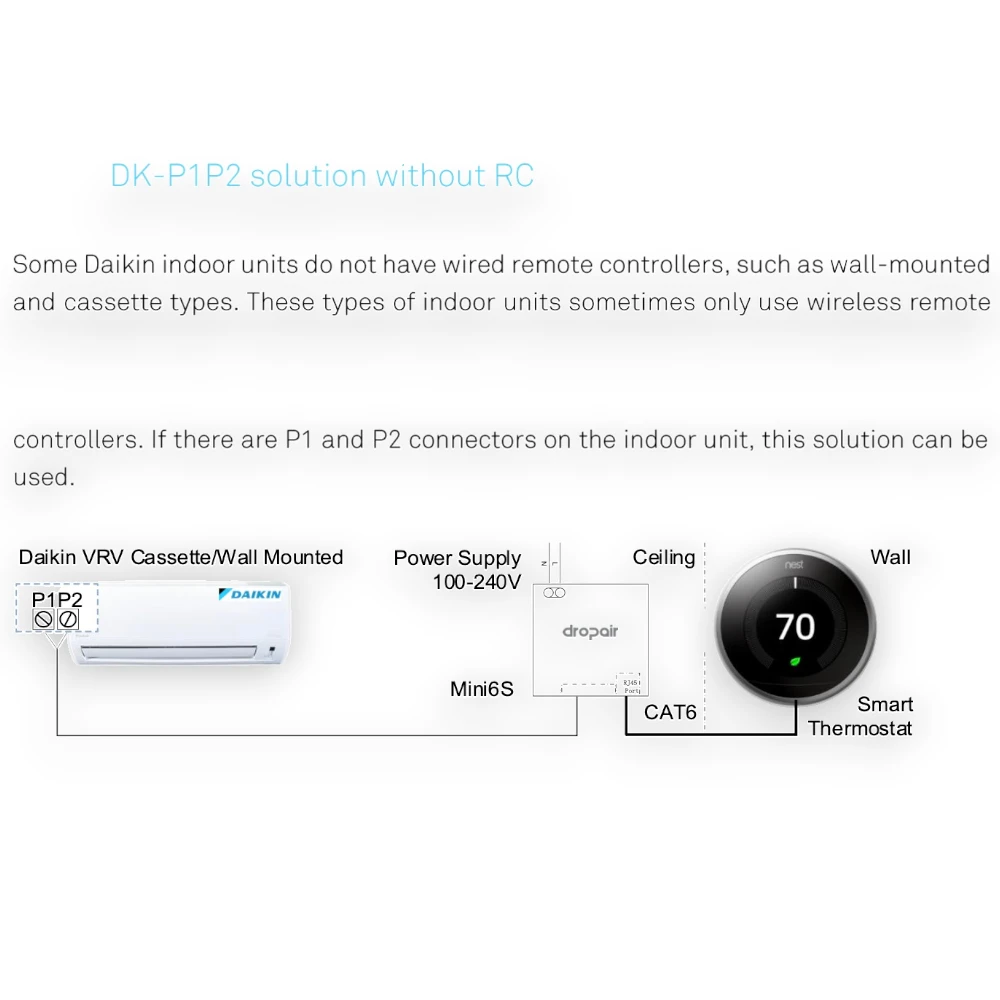
If your system uses P1/P2 terminals, explore the DropAir DK-P1P2 Adapter instead.
Searches for the Daikin S21 protocol usually relate to how the indoor unit exchanges control information with compatible accessories.
The DK-S21 provides a purpose-designed interface for supported applications, so users do not need to develop their own communication electronics.
However, the available commands and thermostat functions depend on the indoor unit, interface configuration and adapter support. This product should not be treated as a universal S21 protocol converter for unrelated equipment.
The manufacturer’s DK-S21 installation reference identifies selected Daikin multi-split indoor-unit families, including:
These series are useful starting points when checking compatibility, but they are not a guarantee that every model within the family has the required connection or supports the same controller arrangement.
Daikin model numbers often include additional letters and numbers that identify a particular generation or equipment configuration.
For an accurate recommendation, provide the complete indoor-unit model rather than only the series name.
The installer should check whether the indoor unit has the correct S21 socket and whether it is already being used by another controller.
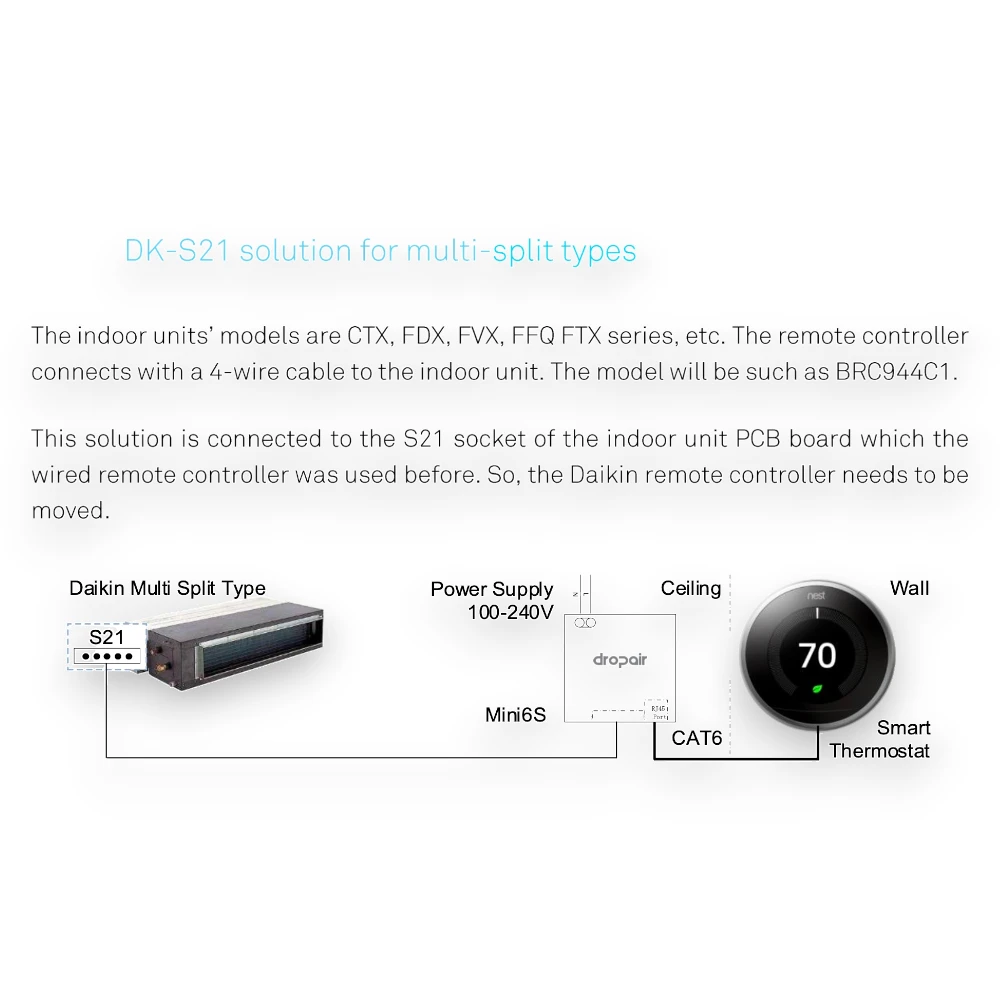
The reference installation shows a Daikin controller connected by a four-wire cable. One controller example is the BRC944C1.
This information helps identify the relevant installation arrangement, but the controller model and its actual connection must still be checked.
One of the most important details about the DropAir DK-S21 Adapter is how it affects an existing Daikin wired remote controller.
The supplied installation diagram shows the DropAir interface connected to the S21 socket previously used by the original wired controller.
For this illustrated configuration, the original controller must be disconnected or moved as required by the supported installation design.
Do not assume that the original Daikin remote and the new smart thermostat can both remain connected to the same S21 socket.
The manufacturer’s illustrated arrangement specifically notes that the existing remote controller must be moved.
If retaining the original Daikin controller is essential, tell JustCare before ordering. A different adapter or supported wiring arrangement may be necessary.
Some customers want to replace their old controller entirely. Others want to keep it as a backup or retain access to particular AC settings.
Understanding this requirement before buying helps avoid selecting an adapter that does not match how the AC should be operated.
The DK-S21 solution uses a DropAir Mini6S interface between the supported Daikin indoor unit and the smart thermostat.
The supplied wiring diagram identifies three main parts of the system:
The adapter connects to the S21 socket on the indoor unit’s PCB using the appropriate connection arrangement.
The manufacturer’s diagram identifies a separate 100–240V AC power supply for the Mini6S interface.
This power input is different from the thermostat’s low-voltage control connection and must be wired according to the correct technical instructions.
The reference diagram shows CAT6 cabling between the DropAir interface and the supported smart thermostat.
The required conductors and termination arrangement must follow the DropAir installation documentation. CAT6 here describes the cabling; it does not mean the thermostat connects through a conventional Ethernet network.
The compatible interface can simplify integration, but installation still requires electrical connections, correct controller configuration and testing.
It should not be approached as a universal plug-in accessory that can be installed without identifying the AC model or wiring requirements.
Google Nest is a popular option for users who want a modern wall thermostat with convenient temperature scheduling and connected controls.
If your Daikin air conditioner uses a supported S21 interface, the DK-S21 may provide the connection required for a compatible Nest installation.
Potentially, yes. The DK-S21 is designed for supported Daikin S21 applications and compatible 24V smart thermostat configurations.
However, the exact Nest generation, required control functions and available wiring must be verified before installation.
No. The answer depends on the type of air conditioner and its original control method.
Some HVAC systems already have suitable 24V thermostat wiring. Others require a dedicated interface, and some may need a different solution entirely.
Supported functions may include temperature adjustments, scheduling and app-based control, subject to the Nest model and the completed AC integration.
Not every advanced feature available on a Nest thermostat is necessarily supported by every Daikin indoor unit.
Explore JustCare’s Google Nest thermostats collection if you are planning a complete thermostat upgrade.
Ecobee thermostats can also be considered for compatible Daikin S21 installations using the appropriate DropAir interface.
The important question is whether the chosen Ecobee model and the Daikin indoor unit can be integrated through the supported control arrangement.
The product is intended to support compatible 24V smart thermostats, including selected Ecobee installations.
Compatibility should be checked against the specific Ecobee model, equipment connection and required control functions rather than assuming all Ecobee thermostats work identically.
With a suitable interface and compatible indoor unit, selected thermostat controls may be available.
Different AC systems may have different operating modes and fan-control capabilities, so the final setup should be confirmed before purchase.
For available options, browse our Ecobee smart thermostats.
The DropAir DK-S21 is also marketed for suitable 24V smart thermostat configurations beyond Nest and Ecobee, including selected Honeywell products.
However, compatibility is determined by the actual thermostat terminals, electrical requirements and supported control functions.
The phrase “24V thermostat” alone is not enough to confirm compatibility.
If you already own a thermostat, provide its exact model number when requesting a compatibility assessment.
DropAir offers different configurations because Daikin systems do not all use the same controller connection.
| Feature | DropAir DK-S21 | DropAir DK-P1P2 |
|---|---|---|
| Primary Connection | Daikin S21 socket | Daikin P1/P2 terminals |
| Typical Application | Selected Daikin multi-split indoor units | Selected Daikin VRV/VRF and other P1/P2 systems |
| Controller Arrangement | Original S21 controller may need to be moved | Depends on with-RC or without-RC configuration |
| Smart Thermostat | Compatible 24V thermostat | Compatible 24V thermostat |
| Selection Basis | Confirmed S21 interface and compatible equipment | Confirmed P1/P2 interface and controller requirements |
If your Daikin system uses P1/P2, review the DropAir DK-P1P2 Adapter instead.
You can also explore our complete DropAir adapters category to compare the available configurations.
| Specification | Details |
|---|---|
| Brand | DropAir |
| Product Model | DK-S21 |
| Product Type | Daikin S21 smart thermostat interface adapter |
| Primary Keyword / Product Type | Daikin S21 Adapter |
| Supported AC Connection | S21 socket on compatible Daikin indoor-unit PCB |
| Typical AC Application | Selected Daikin multi-split systems |
| Referenced AC Families | CTX, FDX, FVX, FFQ and FTX; model-level verification required |
| Example Existing Remote | Daikin BRC944C1 or applicable supported controller arrangement |
| Interface | DropAir Mini6S |
| Power Supply | 100–240V AC, according to the supplied installation diagram |
| Thermostat Connection | Specified CAT6 cable arrangement |
| Thermostat Compatibility | Selected Google Nest, Ecobee, Honeywell and other supported 24V models |
| AC Control Functions | Available functions depend on indoor unit, adapter and thermostat configuration |
| Existing Daikin Controller | May need to be moved or disconnected in the illustrated S21 configuration |
| Installation | Professional electrical and thermostat setup recommended |
| Availability | Check current JustCare product listing |
A small compatibility check before purchase can prevent ordering the wrong adapter.
Find the complete model number on the indoor AC unit or in the equipment documentation.
Share a photograph of the existing wired remote, including any visible model number.
Confirm that the indoor unit has the supported S21 connection and identify whether it is currently occupied.
Specify whether you plan to use Google Nest, Ecobee, Honeywell or another thermostat, including its exact generation or model.
Explain whether you are comfortable replacing the original wired controller or need it to remain functional.
Tell the technician whether the installation involves one indoor unit or multiple controlled zones.
If you don’t have these details, send JustCare photographs of your existing thermostat and indoor-unit model label to begin a compatibility review.
Connecting a smart thermostat to an S21-equipped Daikin air conditioner involves more than mounting a new controller on the wall.
The installer must verify the AC model, identify the correct communication socket, check the electrical supply and ensure that the thermostat commands operate the system as intended.
The existing indoor unit, controller arrangement and thermostat requirements are reviewed before work begins.
The Mini6S interface is connected according to the applicable DropAir diagram, including its separate power supply and thermostat cabling.
Where required by the supported DK-S21 configuration, the original Daikin controller is moved or disconnected.
The compatible thermostat is configured for the available equipment functions.
The technician verifies supported cooling, heating where available, temperature changes and other applicable operating functions.
JustCare provides smart thermostat installation services in Dubai and Abu Dhabi, with other UAE locations assessed according to service availability.
Safety: The Mini6S reference includes a 100–240V electrical supply. Installation should be handled by a qualified technician following the relevant manufacturer’s wiring instructions. The CAT6 thermostat connection must not be treated as a mains-power connection.
If you’re comparing Daikin S21 adapter prices in Dubai or the UAE, look at the complete integration requirements rather than the converter price alone.
The final setup may involve the DK-S21 adapter, a compatible smart thermostat, wiring materials and professional installation.
The current product price is displayed on the JustCare listing. Additional installation work or materials may be charged separately depending on the existing AC and controller configuration.
Buying the correct interface is important. An inexpensive but incompatible adapter can create more problems than it solves.
Most people upgrading to a smart thermostat aren’t looking for an explanation of every electronic component. They simply want to know whether their air conditioner can work with the thermostat they prefer.
JustCare helps customers evaluate the existing Daikin setup before choosing a DropAir solution.
Get help identifying the relevant Daikin model, controller connection and thermostat requirements.
Explore Nest, Ecobee and other available smart thermostats alongside the appropriate adapter.
Request compatible wiring, setup and testing services for your smart thermostat upgrade.
Contact JustCare for product enquiries, compatibility assessments and available installation services.
A Daikin S21 adapter is an interface designed to communicate with a compatible Daikin indoor AC unit through its S21 port. The DropAir DK-S21 enables supported smart thermostat integration using this connection.
It is used to connect selected Daikin multi-split air conditioners with compatible 24V smart thermostats through a DropAir Mini6S interface.
On supported models, the S21 socket is located on the indoor unit’s PCB. The exact location varies by equipment model and should be checked in its technical documentation.
No. They are different Daikin controller interfaces and require the corresponding compatible adapter configuration.
Yes, for supported combinations of Daikin indoor units, Nest thermostats and the appropriate DropAir interface. Exact model compatibility must be confirmed.
It can support selected compatible Ecobee thermostat configurations. Check the Ecobee model and Daikin equipment requirements before ordering.
Selected Honeywell 24V thermostat models may be suitable. Compatibility depends on the required wiring and supported functions.
No. It is designed for supported models with the relevant S21 interface. Other Daikin systems may require P1/P2 or a different adapter.
The manufacturer’s reference identifies selected CTX, FDX, FVX, FFQ and FTX series systems. Individual model and connector compatibility must still be checked.
It refers to the communication interface used by selected Daikin equipment and supported controllers. The DK-S21 provides an interface for compatible smart thermostat control applications.
Yes. The supplied DK-S21 diagram shows the DropAir Mini6S interface between the indoor unit’s S21 connection and the smart thermostat.
Yes. The manufacturer’s installation diagram identifies a separate 100–240V AC supply for the interface.
The supplied installation diagram shows a CAT6 cable connection to the smart thermostat. The exact wiring arrangement must follow the relevant technical instructions.
The illustrated S21 configuration requires the original remote controller using that socket to be moved or disconnected. Confirm the intended controller arrangement before purchasing.
BRC944C1 is an example of a Daikin wired remote controller identified in the DK-S21 reference. Your existing controller’s model should be checked to determine the correct adapter arrangement.
Supported operating functions depend on the specific Daikin indoor unit, thermostat and adapter configuration. Heating is only available where the underlying AC equipment supports it.
Remote control may be available through a compatible connected thermostat and its app. The adapter itself does not guarantee internet access or every thermostat feature.
Do not assume that Mini6S and Mini 6x model references identify interchangeable products. Confirm the exact hardware and installation requirements before choosing a replacement.
Warranty implications depend on the AC manufacturer’s terms, equipment and installation method. Confirm these with the relevant provider before modifying the original controller arrangement.
Professional installation is recommended because the setup involves the indoor unit’s electronic control connection and a separate electrical supply.
JustCare provides compatible smart thermostat and adapter installation services in Dubai, subject to technical assessment.
Yes. Smart thermostat installation enquiries in Abu Dhabi can also be assessed according to compatibility and technician availability.
The current adapter price appears on this product page. Thermostat supply, additional wiring and installation may be charged separately.
The DropAir DK-S21 Daikin S21 Adapter offers a practical way to connect selected Daikin multi-split air conditioners with compatible Google Nest, Ecobee and other supported smart thermostats.
Its S21 connection and Mini6S interface are designed for a specific installation arrangement, so selecting the correct product starts with checking your existing AC and wired controller.
Before ordering, send JustCare your indoor-unit model number, a photograph of the existing Daikin remote and the smart thermostat you want to use.