Shop Samsung smart door locks in UAE, including SHP-DR719 and SHS-P718 fingerprint push-pull models. Compare prices, keyless access and professional installation support in Dubai and Abu Dhabi.
Fill out the form and we’ll get back to you within 24 hours
+971 58 220 0508
contact@justcare.tech
Every day, 9:00 AM – 6:00 PM (Dubai time)
Every day, 8:00 AM – 1:00 AM the following day (Dubai time)
For urgent technical support, contact us on WhatsApp daily from 8:00 AM to 1:00 AM the following day (Dubai time).
A Samsung smart door lock can make everyday entry more convenient by replacing the need to rely entirely on traditional keys. For many homeowners, the biggest benefit is being able to unlock the main door with a fingerprint, PIN code or another supported access method.
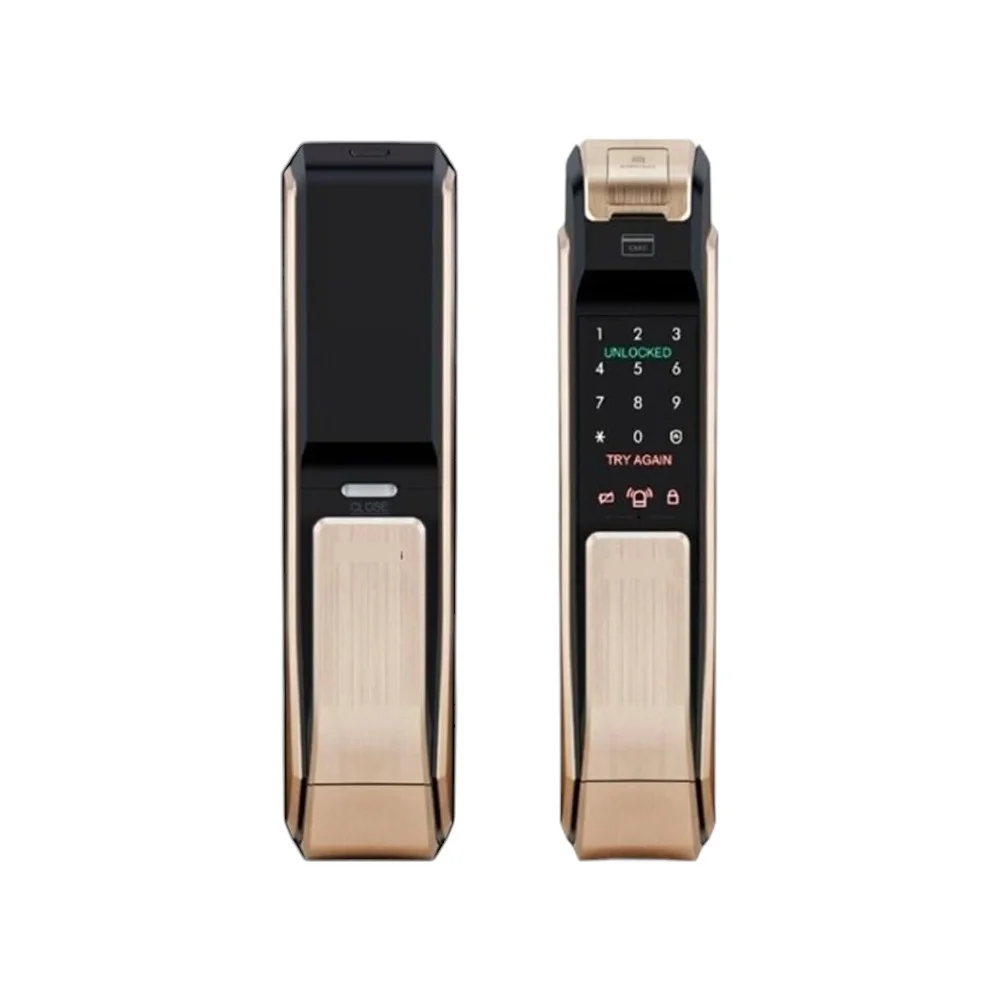
At JustCare, you can explore Samsung smart door locks in UAE for compatible apartment entrances, villas and residential properties. Our current collection includes the Samsung SHP-DR719 and Samsung SHS-P718, two fingerprint-enabled digital locks with push-pull designs.
Both models are worth considering if you prefer the appearance and operation of a push-pull lock rather than a conventional lever handle. However, their features, connectivity and installation requirements should be compared before ordering.
Browse the Samsung door locks available above to see their current prices and product details. To compare additional brands or door-lock designs, visit our Smart Door Locks in UAE collection.
Samsung digital door locks come in different configurations, so it is important to choose by exact model number. Similar-looking locks may have different access methods, electronics, connectivity and mortise requirements.
The Samsung SHP-DR719 is a premium fingerprint door lock with a modern push-pull design. It is a model to consider for customers upgrading a compatible main entrance and looking for convenient biometric access.
When evaluating the SHP-DR719, pay attention to the exact product version, fingerprint functions, other supported credentials, connectivity options and lock-body dimensions.
Some Samsung-branded smart door locks support connected functions, but app availability and regional compatibility can vary. If mobile access is important, confirm which app and features are supported by the exact SHP-DR719 unit being supplied in the UAE.
The Samsung SHS-P718 is another fingerprint-enabled push-pull digital door lock. Its design allows users to open a compatible door through a push-pull handle arrangement rather than operating a conventional lever.
Depending on the exact version, the SHS-P718 supports multiple authentication methods such as fingerprints, PIN codes and compatible key tags, with emergency access arrangements specified in the product documentation.
This model is worth comparing for residential doors where a traditional key-operated lock is being replaced with a more convenient digital access system.
If you are deciding between these two Samsung door locks, compare what matters for your daily use instead of relying on the model number or appearance alone.
| Buying Factor | SHP-DR719 | SHS-P718 |
|---|---|---|
| Product category | Smart fingerprint door lock | Fingerprint digital door lock |
| Handle design | Push-pull style | Push-pull style |
| Fingerprint access | Yes | Yes |
| PIN and alternative credentials | Check supplied variant | Check supplied variant |
| Mobile-app functionality | Confirm exact app and regional support | Do not assume remote app access |
| Door compatibility | Requires model-specific assessment | Requires model-specific assessment |
| Price | See current product listing | See current product listing |
These are different products. Before purchasing, confirm the included hardware, exact product code and installation drawing for the version currently available.
For regular users, keyless access can make entering the home simpler. Instead of searching for keys every time, a supported fingerprint lock recognizes registered users and provides convenient entry.
Fingerprint recognition is particularly practical for family members who use the entrance several times a day. It can reduce dependence on physical keys, while supported alternative credentials provide additional ways to access the property.
If biometric entry is your main buying priority, explore our Fingerprint Door Locks collection to compare products from other brands.
Selected Samsung digital locks support PIN-code entry, allowing authorized users to access the door through a touch keypad. Depending on the model, different users can be registered and access settings managed through the lock’s controls.
For more code-based options, browse our Keypad Door Locks.
A Samsung keyless entry door lock can be useful for households that want a convenient alternative to carrying mechanical keys. However, the available backup methods should be understood before installation.
The lock’s credentials, emergency power options and mechanical backup features must be checked on the exact product version.
Samsung push-pull door locks are recognizable by their distinctive handle design. Instead of rotating a conventional lever after unlocking, users operate a push-pull mechanism.
This can be convenient when carrying shopping bags or entering with occupied hands, but it also means the lock must be physically compatible with the door’s construction and opening arrangement.
The Samsung smart door lock price in UAE depends on the model, access methods, hardware and available features. A more advanced connected smart lock can have a different price from a fingerprint-focused digital lock with primarily local access functions.
When comparing Samsung door lock prices in Dubai, consider the full purchasing and fitting requirements:
Current JustCare prices are shown on the product listings in this category. Before ordering, check whether professional installation is included or quoted separately.
For prices across different brands, read our Smart Door Lock Price in UAE guide.
One of the most important steps in buying a Samsung digital lock for a main door is checking whether the existing door can accommodate the new hardware.
Push-pull smart locks often use larger front and rear panels than conventional handle locks. The existing mortise, door thickness and available fitting space must therefore be checked before choosing a model.
The mortise is the locking mechanism fitted inside the door. Different locks require different mortise dimensions, backsets and fixing positions.
Even if the external handle looks similar, the new Samsung lock may not match the existing cut-outs. Additional drilling or door preparation may be necessary.
Door thickness can affect whether the lock’s front and rear assemblies fit correctly. Customers should also check the space around the existing handle, door edge and nearby decorative trims.
Thick villa doors and doors with unusual hardware deserve particular attention before installation.
Push-pull locks require the correct opening configuration. The installer needs to check the door’s swing direction, handle operation and clearance so that the push-pull mechanism functions as intended.
Samsung push-pull smart locks may be suitable for compatible wooden apartment and villa doors.
Aluminium doors often have narrower profiles with less space for the internal lock body. Glass doors and specialist entrances may require completely different hardware.
Do not assume that a Samsung smart lock will fit every type of door simply because it is marketed for residential use.
For apartment owners, fingerprint access and a push-pull handle can be a practical upgrade where the existing entrance door is compatible.
Before buying, check the current lock dimensions, building requirements and any landlord restrictions on modifications.
For villas, the main considerations often include door construction, thickness, the existing mortise and how frequently the entrance is used.
If the main door is exposed to direct sunlight, dust or rain, check the exact model’s approved installation environment. A smart lock designed for a protected residential entrance should not automatically be treated as weatherproof.
For households where several people need access, review the supported number of fingerprint, PIN and card users, as applicable to the chosen model.
It is also useful to understand how credentials can be added or removed and what the household should do if the lock needs to be reset.
If you have researched Samsung smart locks online, you may also have come across the Zigbang name.
Zigbang acquired the Samsung SDS door-lock and home-network business in 2022. As a result, some products and technologies previously associated with Samsung digital door locks are now marketed under Zigbang branding.
This does not mean that every older Samsung-branded smart lock is identical to a newer Zigbang model.
For customers considering an SHP-DR719 or SHS-P718, the practical questions are:
These checks are particularly important for imported models and customers who want connected features rather than only local fingerprint and PIN access.
Some Samsung-branded digital door locks provide connected features, but not every model supports WiFi, remote unlocking or direct integration with Samsung SmartThings.
Before choosing a Samsung smart lock for your front door, confirm the exact model’s supported functions and regional app requirements.
Samsung also offers Digital Home Key features through Samsung Wallet for certain compatible modern smart locks. This should not be confused with automatic support for older Samsung SHP or SHS digital lock models.
If app-based control is essential, compare the verified functions of your selected Samsung model or browse our App-Controlled Door Locks range.
Fingerprint and PIN-based access on compatible Samsung digital locks generally uses local authentication rather than requiring a continuous internet connection for every unlock.
However, the exact offline functions depend on the model. Connected features, where available, may need WiFi, a supported app or another compatible network setup.
Before ordering, check which access methods work during an internet outage and which backup methods are available during a battery or electronic fault.
Samsung digital door locks use electronic power systems, so battery management is an important part of ownership.
Depending on the model, low-battery notifications, emergency power terminals and mechanical backup methods may be available.
Customers should review the exact lock manual to understand:
These details are especially useful for families and homeowners replacing their only traditional entrance lock.
JustCare offers Samsung smart door locks to customers in the UAE, with Dubai and Abu Dhabi as primary areas for professional smart lock installation support.
Whether you are shopping for a Samsung door lock in Dubai or comparing a Samsung fingerprint door lock for an Abu Dhabi apartment, you can review the available models and prices online.
Customers in Sharjah, Ajman and other emirates can also enquire about product availability and delivery. Installation outside the main service areas depends on technician availability and any applicable travel charges.
Correct installation is particularly important with push-pull digital locks. The mortise, handle mechanism and strike plate must be properly aligned so the door opens and locks smoothly.
JustCare provides professional Smart Lock Installation for compatible Samsung digital door locks, including suitable customer-supplied models.
Depending on the door and selected lock, installation may involve:
If you are unsure whether the SHP-DR719 or SHS-P718 will fit your existing door, share photos of the front, back and edge of the current lock before booking installation.
Buying a Samsung digital door lock should be straightforward, but model variants, older product naming and door compatibility can make the decision more complicated than expected.
At JustCare, you can:
If you need a different locking style or access technology, see our full Smart Door Locks collection.
You can browse Samsung smart door locks online at JustCare. The current category includes the SHP-DR719 and SHS-P718 fingerprint models, subject to product availability.
The price depends on the Samsung model and available features. Current product prices are displayed on this category page, with installation requirements assessed separately.
Both are fingerprint-enabled digital locks with push-pull designs. Their exact connectivity, supported access methods, hardware and installation requirements differ and should be compared using the model-specific documentation.
Yes. The SHP-DR719 and SHS-P718 listed in this collection are fingerprint-enabled locks.
Yes. Samsung digital door locks are known for several push-pull models, including the SHP-DR719 and SHS-P718.
Local fingerprint and PIN access can work without continuous internet connectivity on supported models. Remote functions, if available, may require the appropriate network and app setup.
Do not assume that every Samsung-branded door lock supports SmartThings. Compatibility depends on the exact model, regional firmware and supported integration.
Zigbang acquired Samsung SDS’s door-lock business in 2022, but older Samsung-branded products should not automatically be treated as identical to newer Zigbang models. Check the exact model and supported app.
Many push-pull digital locks may suit compatible wooden main doors. Door thickness, existing mortise, cut-out positions and handle clearance must be checked before installation.
Some aluminium doors may accommodate compatible electronic locks, but narrow profiles can make fitting a full-size push-pull lock difficult. A compatibility check is recommended.
Do not assume that the SHP-DR719 or SHS-P718 includes a camera. If camera-based visitor viewing is essential, compare the verified specifications or explore a dedicated camera smart lock.
Backup arrangements vary by model and can include emergency power or mechanical access options. Check the exact model manual and understand its emergency procedure before regular use.
Yes. JustCare can assess and install compatible customer-supplied Samsung digital locks, subject to the lock’s condition, available hardware and the existing door configuration.
Suitability depends on the property’s access-management needs and applicable regulations. Do not assume a Samsung model is SIRA-approved without checking the exact product and current requirements.
Explore the Samsung smart locks listed above to compare designs, current prices and keyless entry features. Whether you want a Samsung fingerprint door lock for your apartment or a push-pull digital lock for a villa, confirm the model and door compatibility before purchasing.
Need help deciding? Contact JustCare on WhatsApp with your preferred Samsung model and door photos.